



环形进度条、精确秒级倒计时、Web Audio 提示音——这是一个完整可用的计时器组件,核心逻辑不到 100 行。
这个计时器基于番茄工作法的理念设计,有四个预设时长可选,环形进度条随时间实时推进,完成后触发提示音。所有代码没有依赖任何外部库,用原生 HTML/CSS/JavaScript 实现。
效果演示
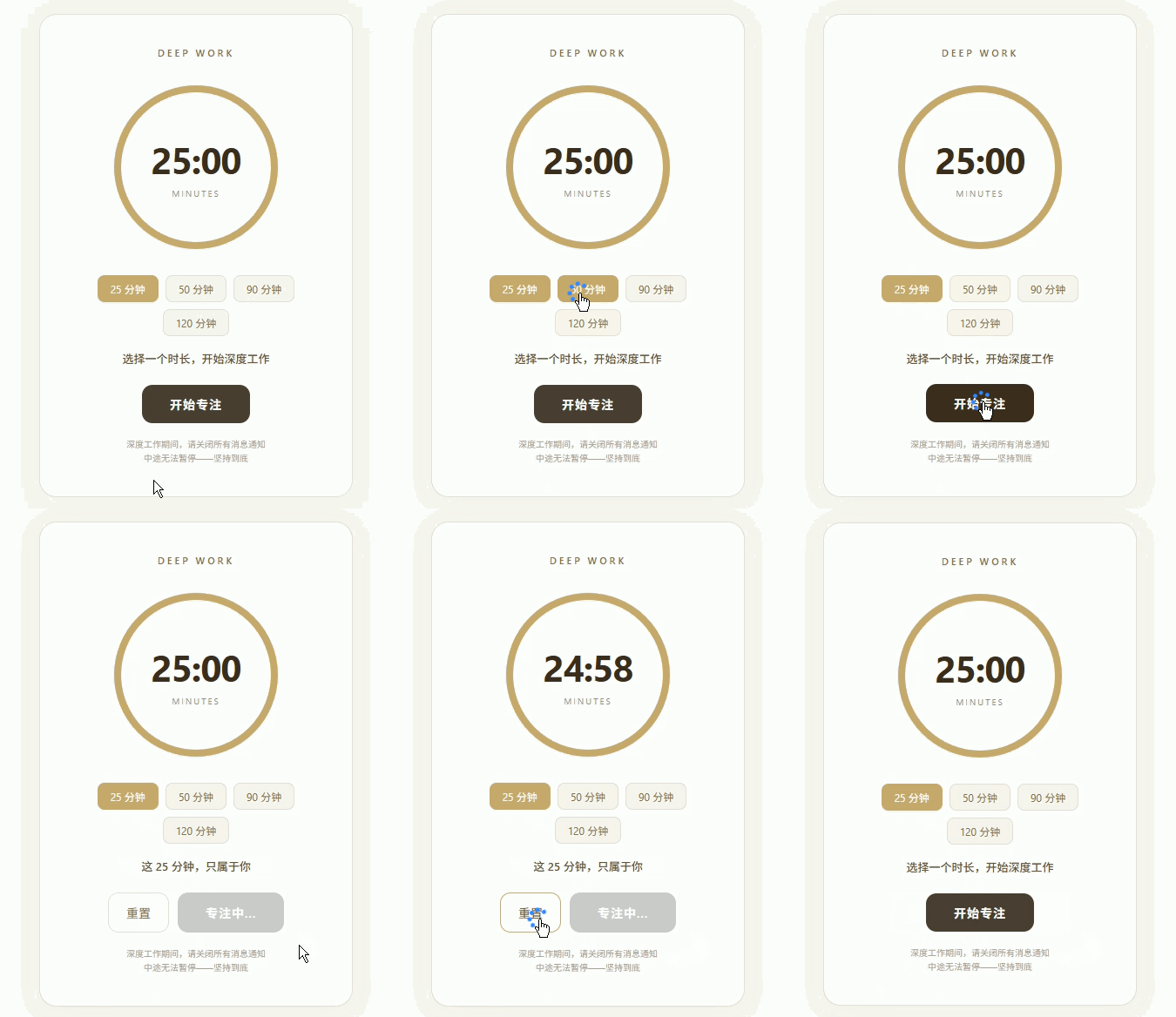
完整代码如下,可直接保存为 .html 文件在浏览器打开:
<!DOCTYPE html>
<html lang="zh-CN">
<head>
<meta charset="UTF-8">
<meta name="viewport" content="width=device-width, initial-scale=1.0">
<title>深度工作计时器</title>
<style>
  * { margin: 0; padding: 0; box-sizing: border-box; }
  body {
    background: #faf8f5;
    display: flex;
    align-items: center;
    justify-content: center;
    min-height: 100vh;
    font-family: -apple-system, BlinkMacSystemFont, 'Segoe UI', sans-serif;
  }

  .focus-card {
    background: #fff;
    border: 1px solid #e8e0d5;
    border-radius: 20px;
    padding: 36px 40px;
    width: 360px;
    text-align: center;
    box-shadow: 0 4px 24px rgba(74, 63, 53, 0.06);
  }

  .focus-title {
    font-size: 11px;
    letter-spacing: 3px;
    text-transform: uppercase;
    color: #8b6f47;
    margin-bottom: 24px;
    font-weight: 600;
  }

  .timer-ring {
    position: relative;
    width: 200px;
    height: 200px;
    margin: 0 auto 24px;
  }

  .timer-ring svg {
    transform: rotate(-90deg);
    width: 200px;
    height: 200px;
  }

  .timer-ring circle {
    fill: none;
    stroke-width: 8;
    stroke-linecap: round;
  }

  .timer-bg { stroke: #f0e8df; }

  .timer-progress {
    stroke: #c9a96e;
    stroke-dasharray: 565;
    stroke-dashoffset: 0;
    transition: stroke-dashoffset 1s linear;
  }

  .timer-display {
    position: absolute;
    top: 50%;
    left: 50%;
    transform: translate(-50%, -50%);
    text-align: center;
  }

  .timer-time {
    font-size: 42px;
    font-weight: 700;
    color: #3d2e1f;
    letter-variant-numeric: tabular-nums;
  }

  .timer-label {
    font-size: 10px;
    letter-spacing: 2px;
    text-transform: uppercase;
    color: #9c8c7a;
    margin-top: 4px;
  }

  .focus-phase {
    font-size: 13px;
    color: #6b5235;
    margin-bottom: 20px;
    min-height: 20px;
    font-weight: 500;
  }

  .preset-buttons {
    display: flex;
    gap: 8px;
    justify-content: center;
    margin-bottom: 16px;
    flex-wrap: wrap;
  }

  .preset-btn {
    background: #faf5ef;
    border: 1px solid #e8e0d5;
    border-radius: 8px;
    padding: 6px 14px;
    font-size: 12px;
    color: #8b6f47;
    cursor: pointer;
    transition: all 0.2s;
    font-family: inherit;
  }

  .preset-btn:hover, .preset-btn.active {
    background: #c9a96e;
    color: #fff;
    border-color: #c9a96e;
  }

  .timer-controls {
    display: flex;
    gap: 10px;
    justify-content: center;
  }

  .btn-primary {
    background: #4a3f35;
    color: #fff;
    border: none;
    border-radius: 12px;
    padding: 12px 32px;
    font-size: 14px;
    font-weight: 600;
    cursor: pointer;
    transition: all 0.2s;
    font-family: inherit;
    letter-spacing: 1px;
  }

  .btn-primary:hover {
    background: #3d2e1f;
    transform: translateY(-1px);
  }

  .btn-primary:active { transform: translateY(0); }

  .btn-primary:disabled {
    background: #ccc;
    cursor: not-allowed;
    transform: none;
  }

  .btn-secondary {
    background: #fff;
    color: #8b6f47;
    border: 1px solid #e8e0d5;
    border-radius: 12px;
    padding: 12px 20px;
    font-size: 14px;
    cursor: pointer;
    transition: all 0.2s;
    font-family: inherit;
  }

  .btn-secondary:hover {
    border-color: #c9a96e;
    color: #6b5235;
  }

  .timer-note {
    font-size: 10px;
    color: #b0a090;
    margin-top: 16px;
    line-height: 1.6;
  }
</style>
</head>
<body>

<div class="focus-card">
  <div class="focus-title">Deep Work</div>

  <div class="timer-ring">
    <svg viewBox="0 0 200 200">
      <circle class="timer-bg" cx="100" cy="100" r="90"/>
      <circle class="timer-progress" id="progressCircle" cx="100" cy="100" r="90"/>
    </svg>
    <div class="timer-display">
      <div class="timer-time" id="timerDisplay">25:00</div>
      <div class="timer-label">MINUTES</div>
    </div>
  </div>

  <div class="preset-buttons">
    <button class="preset-btn active" onclick="setPreset(25, this)">25 分钟</button>
    <button class="preset-btn" onclick="setPreset(50, this)">50 分钟</button>
    <button class="preset-btn" onclick="setPreset(90, this)">90 分钟</button>
    <button class="preset-btn" onclick="setPreset(120, this)">120 分钟</button>
  </div>

  <div class="focus-phase" id="phaseText">选择一个时长,开始深度工作</div>

  <div class="timer-controls">
    <button class="btn-secondary" id="resetBtn" onclick="resetTimer()" style="display:none">重置</button>
    <button class="btn-primary" id="startBtn" onclick="startTimer()">开始专注</button>
  </div>

  <div class="timer-note">
    深度工作期间,请关闭所有消息通知<br>
    中途无法暂停——坚持到底
  </div>
</div>

<script>
const CIRCUMFERENCE = 2 * Math.PI * 90; // ≈ 565.49
const progressCircle = document.getElementById('progressCircle');
const timerDisplay = document.getElementById('timerDisplay');
const phaseText = document.getElementById('phaseText');
const startBtn = document.getElementById('startBtn');
const resetBtn = document.getElementById('resetBtn');

let totalSeconds = 25 * 60;
let remainingSeconds = totalSeconds;
let timerInterval = null;
let isRunning = false;

progressCircle.style.strokeDasharray = CIRCUMFERENCE;
progressCircle.style.strokeDashoffset = 0;

const phrases = [
  '保持专注,世界会为你让路',
  '这 25 分钟,只属于你',
  '深度工作进行中',
  '你的大脑正在最佳状态',
  '继续,不要中断',
];

function setPreset(minutes, btn) {
  if (isRunning) return;
  totalSeconds = minutes * 60;
  remainingSeconds = totalSeconds;
  updateDisplay();
  document.querySelectorAll('.preset-btn').forEach(b => b.classList.remove('active'));
  btn.classList.add('active');
  progressCircle.style.strokeDashoffset = 0;
}

function updateDisplay() {
  const m = Math.floor(remainingSeconds / 60);
  const s = remainingSeconds % 60;
  timerDisplay.textContent = `${String(m).padStart(2, '0')}:${String(s).padStart(2, '0')}`;
}

function updateProgress() {
  const offset = CIRCUMFERENCE * (1 - remainingSeconds / totalSeconds);
  progressCircle.style.strokeDashoffset = offset;
}

function startTimer() {
  if (isRunning) return;
  isRunning = true;
  startBtn.disabled = true;
  startBtn.textContent = '专注中...';
  resetBtn.style.display = 'inline-block';
  phaseText.textContent = phrases[Math.floor(Math.random() * phrases.length)];

  timerInterval = setInterval(() => {
    remainingSeconds--;
    updateDisplay();
    updateProgress();

    if (remainingSeconds <= 0) {
      clearInterval(timerInterval);
      timerInterval = null;
      phaseText.textContent = '🎉 深度工作完成!';
      timerDisplay.textContent = 'DONE';
      startBtn.textContent = '再来一次';
      startBtn.disabled = false;
      isRunning = false;
      try {
        const ctx = new (window.AudioContext || window.webkitAudioContext)();
        const osc = ctx.createOscillator();
        const gain = ctx.createGain();
        osc.connect(gain);
        gain.connect(ctx.destination);
        osc.frequency.value = 880;
        gain.gain.setValueAtTime(0.3, ctx.currentTime);
        gain.gain.exponentialRampToValueAtTime(0.01, ctx.currentTime + 0.8);
        osc.start(ctx.currentTime);
        osc.stop(ctx.currentTime + 0.8);
      } catch (e) {}
    }
  }, 1000);
}

function resetTimer() {
  clearInterval(timerInterval);
  timerInterval = null;
  isRunning = false;
  remainingSeconds = totalSeconds;
  updateDisplay();
  updateProgress();
  phaseText.textContent = '选择一个时长,开始深度工作';
  startBtn.textContent = '开始专注';
  startBtn.disabled = false;
  resetBtn.style.display = 'none';
}

updateDisplay();
</script>
</body>
</html>
{/collapse-item}
核心原理解析
1. 环形进度条:SVG + stroke-dasharray
这是计时器最关键的部分。SVG 的
<svg viewBox="0 0 200 200">
  <circle cx="100" cy="100" r="90" class="timer-bg"/>
  <circle cx="100" cy="100" r="90" class="timer-progress" id="progressCircle"/>
</svg>
stroke-dasharray 把一条连续的描边切成等长的虚线段,stroke-dashoffset 控制虚线的起点偏移量:
const CIRCUMFERENCE = 2 * Math.PI * 90; // 周长 ≈ 565.49
progressCircle.style.strokeDasharray = CIRCUMFERENCE; // 虚线段长度 = 整条圆周
progressCircle.style.strokeDashoffset = 0;            // 起点偏移 = 0,全部可见
当倒计时进行时:
// 剩余 50% 时间 → offset 为周长的一半 → 可见长度 = 周长 * 50%
const offset = CIRCUMFERENCE * (1 - remainingSeconds / totalSeconds);
progressCircle.style.strokeDashoffset = offset;
transition: stroke-dashoffset 1s linear 让每次偏移变化平滑过渡——不需要 JavaScript 控制动画帧,CSS 帮你自动补间。
2. 倒计时逻辑:setInterval + 状态管理
let totalSeconds = 25 * 60;     // 总秒数
let remainingSeconds = totalSeconds; // 剩余秒数
let timerInterval = null;        // setInterval 返回的 ID
let isRunning = false;           // 运行状态锁

timerInterval = setInterval(() => {
  remainingSeconds--;             // 每秒减 1
  updateDisplay();               // 更新数字显示
  updateProgress();              // 更新环形进度

  if (remainingSeconds <= 0) {
    clearInterval(timerInterval); // 时间到,停止计时器
    timerInterval = null;
    playSound();                 // 触发提示音
  }
}, 1000);
关键点:状态锁 isRunning 防止计时器重复启动。如果用户快速连点"开始"按钮,第二个 startTimer() 调用会因为 isRunning === true 直接 return,而不会创建第二个 setInterval。
3. 预设按钮:选中状态 + 锁定运行中状态
function setPreset(minutes, btn) {
  if (isRunning) return;  // 计时中不允许切换时长

  totalSeconds = minutes * 60;
  remainingSeconds = totalSeconds;
  updateDisplay();

  // 清除所有按钮的 active 状态,给当前按钮加 active
  document.querySelectorAll('.preset-btn').forEach(b => b.classList.remove('active'));
  btn.classList.add('active');

  progressCircle.style.strokeDashoffset = 0; // 重置环形进度
}
"计时中不允许切换时长"是一个有意为之的设计决策:强制用户为每一个计时周期做出明确的选择,减少随意性带来的仪式感。
4. 提示音:Web Audio API
const ctx = new (window.AudioContext || window.webkitAudioContext)();
const osc = ctx.createOscillator();  // 声音振子
const gain = ctx.createGain();       // 音量控制器

osc.connect(gain);       // 振子 → 音量控制 → 扬声器
gain.connect(ctx.destination);

osc.frequency.value = 880;           // 频率 880Hz(A5 音符)
gain.gain.setValueAtTime(0.3, ctx.currentTime);           // 起始音量
gain.gain.exponentialRampToValueAtTime(0.01, ctx.currentTime + 0.8); // 0.8秒内指数衰减到静音

osc.start(ctx.currentTime);   // 立即开始
osc.stop(ctx.currentTime + 0.8); // 0.8秒后停止
频率 880Hz 听起来是一个干净的高音 A,exponentialRampToValueAtTime 实现自然的声音衰减,不需要音频文件,一个 API 调用就能合成出来。
数据结构
整个组件只有两个核心状态变量:
let totalSeconds = 25 * 60;      // 当前设定的总时长(秒)
let remainingSeconds = totalSeconds; // 倒计时剩余秒数
其他所有变量都是这两者的衍生:
| 变量 | 类型 | 说明 |
|---|---|---|
| CIRCUMFERENCE | 常量 | 圆的周长(px),计算进度偏移量用 |
| timerInterval | number\null | setInterval 的 ID,null 表示未运行 |
| isRunning | boolean | 运行状态锁,防止重复启动 |
| phrases[] | string[] | 口号文案数组,随机选一条显示 |
可调节参数
| 参数 | 默认值 | 作用 |
|---|---|---|
| CIRCUMFERENCE | 2π × 90 | 根据 SVG 圆圈半径计算,调整半径时同步修改 |
| 25 * 60 | 1500 秒 | 默认预设时长(25 分钟) |
| phrases[] | 5 条口号 | 计时开始时随机显示的文案 |
| osc.frequency.value | 880 | 提示音频率(Hz),越高越尖锐 |
实际用途
这个计时器可以嵌入多种场景:
博客侧边栏:作为南枝已谢或荣小站的挂件工具,读者在阅读文章时可以顺手开启一个专注计时
个人首页:代替传统的"联系我"区块,用一个实用的工具留住访客
团队看板:在内部工具中作为番茄工作法提醒,减少无效会议
评语 (0)