
诗词随机切换卡片特效
诗词随机切换卡片特效
每一张卡片,都是一句诗。每一次切换,都是一次与古人的相遇。
这个卡片特效,可以在博客侧边栏、首页横幅或任意位置嵌入。它会在已收录的诗词中自动轮播,用户也可以手动切换。
效果演示
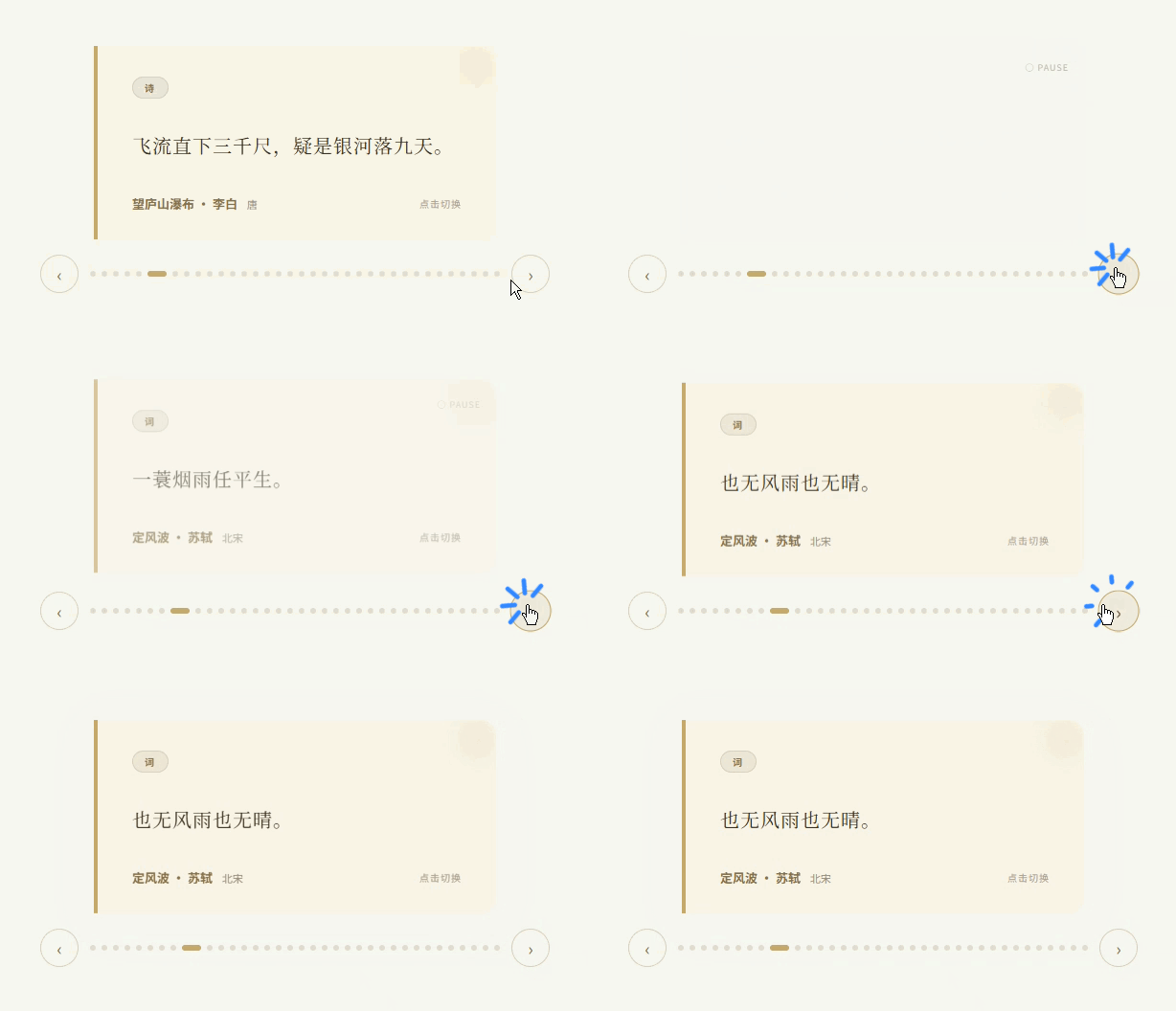
完整代码
点击展开/折叠完整代码
<!DOCTYPE html>
<html lang="zh-CN">
<head>
<meta charset="UTF-8">
<meta name="viewport" content="width=device-width, initial-scale=1.0">
<title>诗词随机卡片 · 南枝已谢</title>
<style>
  * { margin: 0; padding: 0; box-sizing: border-box; }
  body {
    background: #faf8f5;
    display: flex;
    align-items: center;
    justify-content: center;
    min-height: 100vh;
    font-family: 'Georgia', 'Songti SC', serif;
  }
  .poetry-slider { position: relative; width: 420px; max-width: 90vw; }
  .poetry-card {
    position: relative;
    background: #fdf5ea;
    border-left: 4px solid #c9a96e;
    border-radius: 0 16px 16px 0;
    padding: 32px 36px 28px;
    cursor: pointer;
    transition: transform 0.3s ease, box-shadow 0.3s ease;
    overflow: hidden;
    min-height: 180px;
    display: flex;
    flex-direction: column;
    justify-content: center;
  }
  .poetry-card:hover { transform: translateY(-3px); box-shadow: 0 12px 40px rgba(139,111,71,0.12); }
  .poetry-card::before { content: ''; position: absolute; top: -20px; right: -20px; width: 80px; height: 80px; background: radial-gradient(circle, rgba(201,169,110,0.12) 0%, transparent 70%); border-radius: 50%; pointer-events: none; }
  .card-tag { display: inline-block; font-family: -apple-system, sans-serif; font-size: 10px; font-weight: 700; letter-spacing: 2px; text-transform: uppercase; color: #8b6f47; background: rgba(139,111,71,0.1); padding: 3px 12px; border-radius: 20px; border: 1px solid rgba(139,111,71,0.2); margin-bottom: 14px; width: fit-content; }
  .card-quote { font-size: 20px; line-height: 1.8; color: #3d2e1f; letter-spacing: 1px; margin-bottom: 14px; min-height: 72px; display: flex; align-items: center; }
  .card-meta { display: flex; align-items: center; justify-content: space-between; }
  .card-author { font-family: -apple-system, sans-serif; font-size: 13px; color: #8b6f47; font-weight: 600; }
  .card-dynasty { font-family: -apple-system, sans-serif; font-size: 11px; color: #9c8c7a; margin-left: 6px; }
  .card-hint { font-family: -apple-system, sans-serif; font-size: 10px; color: #b0a090; letter-spacing: 1px; }
  .poetry-card.fade-out { opacity: 0; transform: translateY(-10px); transition: opacity 0.3s ease, transform 0.3s ease; }
  .poetry-card.fade-in { opacity: 1; transform: translateY(0); transition: opacity 0.3s ease, transform 0.3s ease; }
  .slider-controls { display: flex; align-items: center; justify-content: center; gap: 12px; margin-top: 16px; }
  .slider-btn { background: none; border: 1px solid rgba(139,111,71,0.3); border-radius: 50%; width: 40px; height: 40px; display: flex; align-items: center; justify-content: center; cursor: pointer; color: #8b6f47; font-size: 18px; transition: all 0.2s ease; flex-shrink: 0; }
  .slider-btn:hover { background: rgba(201,169,110,0.15); border-color: #c9a96e; transform: scale(1.08); }
  .slider-dot { width: 6px; height: 6px; border-radius: 50%; background: rgba(139,111,71,0.2); border: none; cursor: pointer; transition: all 0.3s ease; }
  .slider-dot.active { background: #c9a96e; width: 20px; border-radius: 3px; }
  .auto-badge { position: absolute; top: 16px; right: 16px; font-family: -apple-system, sans-serif; font-size: 9px; color: #c9a96e; letter-spacing: 1px; text-transform: uppercase; opacity: 0.6; }
  .auto-badge.paused { color: #9c8c7a; }
</style>
</head>
<body>
<div class="poetry-slider">
  <div class="auto-badge" id="autoBadge">● AUTO</div>
  <div class="poetry-card" id="card">
    <span class="card-tag" id="cardTag">词</span>
    <div class="card-quote" id="cardQuote">落花人独立,微雨燕双飞。</div>
    <div class="card-meta">
      <div><span class="card-author" id="cardAuthor">临江仙 · 晏几道</span><span class="card-dynasty" id="cardDynasty">北宋</span></div>
      <div class="card-hint">点击切换</div>
    </div>
  </div>
  <div class="slider-controls">
    <button class="slider-btn" onclick="prevPoem(event)">‹</button>
    <div class="slider-dots" id="sliderDots"></div>
    <button class="slider-btn" onclick="nextPoem(event)">›</button>
  </div>
</div>
<script>
const poems = [
  { type:'词', quote:'落花人独立,微雨燕双飞。', author:'晏几道', dynasty:'北宋', title:'临江仙' },
  { type:'词', quote:'才下眉头,却上心头。', author:'李清照', dynasty:'北宋', title:'一剪梅' },
  { type:'词', quote:'大江东去,浪淘尽,千古风流人物。', author:'苏轼', dynasty:'北宋', title:'念奴娇' },
  // ...更多诗词
];
let currentIndex = 0, autoTimer = null, isPlaying = true, INTERVAL = 5000;
const card = document.getElementById('card'), cardTag = document.getElementById('cardTag');
const cardQuote = document.getElementById('cardQuote'), cardAuthor = document.getElementById('cardAuthor');
const cardDynasty = document.getElementById('cardDynasty'), sliderDots = document.getElementById('sliderDots');
function buildDots() { sliderDots.innerHTML = ''; for(let i=0;i<poems.length;i++){ const dot=document.createElement('button'); dot.className='slider-dot'+(i===currentIndex?' active':''); dot.onclick=(e)=>{e.stopPropagation();goTo(i);};sliderDots.appendChild(dot);} }
function updateCard(poem){ card.classList.add('fade-out'); setTimeout(()=>{ cardTag.textContent=poem.type; cardQuote.textContent=poem.quote; cardAuthor.textContent=poem.title+' · '+poem.author; cardDynasty.textContent=poem.dynasty; card.classList.remove('fade-out'); card.classList.add('fade-in'); setTimeout(()=>card.classList.remove('fade-in'),300); },300); }
function goTo(i){ currentIndex=i; updateCard(poems[currentIndex]); sliderDots.querySelectorAll('.slider-dot').forEach((d,j)=>d.className='slider-dot'+(j===currentIndex?' active':'')); resetTimer(); }
function nextPoem(e){ if(e)e.stopPropagation(); currentIndex=(currentIndex+1)%poems.length; updateCard(poems[currentIndex]); sliderDots.querySelectorAll('.slider-dot').forEach((d,j)=>d.className='slider-dot'+(j===currentIndex?' active':'')); resetTimer(); }
function prevPoem(e){ if(e)e.stopPropagation(); currentIndex=(currentIndex-1+poems.length)%poems.length; updateCard(poems[currentIndex]); sliderDots.querySelectorAll('.slider-dot').forEach((d,j)=>d.className='slider-dot'+(j===currentIndex?' active':'')); resetTimer(); }
function startTimer(){ autoTimer=setInterval(()=>nextPoem(),INTERVAL); }
function resetTimer(){ if(autoTimer)clearInterval(autoTimer); if(isPlaying)startTimer(); }
card.addEventListener('click',()=>{ if(isPlaying){clearInterval(autoTimer);isPlaying=false;document.getElementById('autoBadge').textContent='○ PAUSE';}else{isPlaying=true;document.getElementById('autoBadge').textContent='● AUTO';resetTimer();} });
buildDots();startTimer();
</script>
</body>
</html>
数据结构
卡片依赖一个简洁的 JSON 数组:
const poems = [
  { type: '词', quote: '落花人独立,微雨燕双飞。', author: '晏几道', dynasty: '北宋', title: '临江仙' },
  { type: '词', quote: '一蓑烟雨任平生。', author: '苏轼', dynasty: '北宋', title: '定风波' },
  { type: '诗', quote: '但愿人长久,千里共婵娟。', author: '苏轼', dynasty: '北宋', title: '水调歌头' },
  // ... 可无限扩展
];| 字段 | 说明 |
|---|---|
| type | 左上角标签,"诗"或"词" |
| quote | 卡片中央显示的名句 |
| title | 诗词标题 |
| author | 作者名 |
| dynasty | 朝代 |
核心机制
1. 淡入淡出动画
通过 CSS class 切换实现,不需要任何动画库:
.poetry-card.fade-out {
  opacity: 0;
  transform: translateY(-10px);
  transition: opacity 0.3s, transform 0.3s;
}
.poetry-card.fade-in {
  opacity: 1;
  transform: translateY(0);
  transition: opacity 0.3s, transform 0.3s;
}
切换时:先加 fade-out(淡出并上移)→ 300ms 后更新内容 → 再加 fade-in(淡入归位)。
2. 自动播放与手动切换
function startTimer() {
  autoTimer = setInterval(() => nextPoem(), INTERVAL);
}
function resetTimer() {
  clearInterval(autoTimer);
  if (isPlaying) startTimer();
}
每次手动切换后重置计时器,自动播放不会中断。
3. 点击暂停/恢复
card.addEventListener('click', () => {
  if (isPlaying) {
    clearInterval(autoTimer);
    isPlaying = false;
    // 显示 PAUSE 状态
  } else {
    isPlaying = true;
    resetTimer();
    // 显示 AUTO 状态
  }
});
点击卡片本身,切换自动播放状态。"● AUTO"变为"○ PAUSE",适合用户想停下来细读某一句诗的场景。
可调节参数
| 参数 | 默认值 | 作用 |
|---|---|---|
| INTERVAL | 5000 | 自动切换间隔(毫秒) |
| transition | 0.3s | 淡入淡出动画时长 |
| 背景色 | #fdf5ea | 暖米色卡片背景 |
| 边框色 | #c9a96e | 暖金色左侧边框 |
部署建议
- 独立页面:直接保存为 .html 文件即可运行
- 嵌入博客:将
<style>部分放入博客主题的 CSS,将<div>和<script>部分嵌入 HTML 模板即可 - 接入已有诗词库:把现有的 30+ 首诗词数据导出为 JSON,替换掉 poems 数组即可
评论